
Clear, inclusive conference calls
Bad IP connection? Fellow conferencers who haven’t installed Voxeet? We have you covered.
If your IP connection isn’t cutting it, simply click the Dial-In icon on your screen to switch your conference call to a local phone line. Non-Voxeet users get local dial-in numbers (available in over 40 countries) and personal PINs with their call invites.
Banish bad connections. Forget long-distance charges. Keep your calls local.
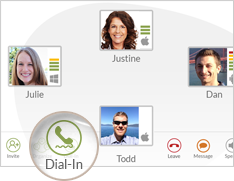
Decide to Dial In
Experiencing a low-quality IP connection during your conference call? Click “Dial in.”

Autodial locally
We’ll give you a local phone number you can use instead. Autodial it with one click.

Reconnect
You’ll be dialed back in to your conference call in seconds.